Turning scattered operations into one shared workspace
Jobbit connects teams, tasks, purchasing, and supply chain events into a single operating view. I led product design across the web app so operations leads can see real status and unblock work without juggling a wall of different tools.
Role
Lead product designer
Scope
Discovery, UX strategy, IA, flows, UI, design system
For
Teams in installations, services, and multi vendor work
40% less
Time to reliable overview
Less chasing people for updates
60% less
Shadow spreadsheets
Teams kept Jobbit as their source of truth
3 times higher
Tool adoption
Ops, team leads, and vendors stayed in the product
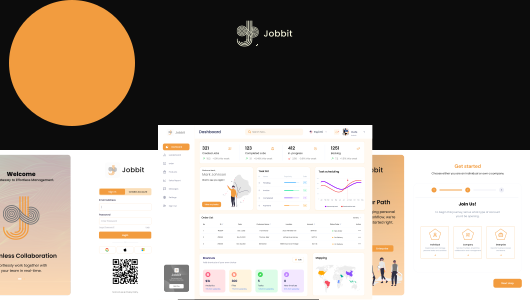
Ops workspace
Where projects, vendors, and timing line up
Company profile
10 to 50 people, multi vendor operations, hybrid teams
Implementation goal
Replace slide decks, side spreadsheets, and status meetings with one shared view
Project snapshot
A console for teams who care about projects, vendors, and timing at the same time.
Jobbit is used by teams who ship work in the physical world. They need to know what is in progress, what is blocked, and where money and vendors are involved, without combing through five separate tools.
Team reality
Status lives in chat, plans in slides, money in email, and delivery dates in vendor portals.
Product ambition
One operating view that shows work, dependencies, and supplier risk in a way people actually trust.
My impact
Reframed Jobbit from a feature set into a system, then designed flows and UI that feel calm to use.
System view
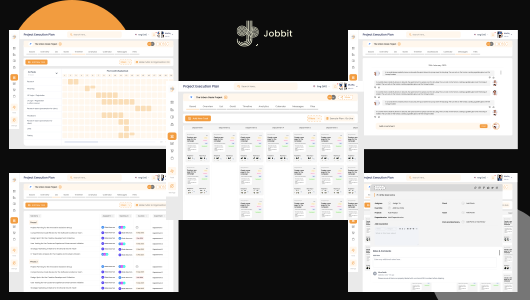
One model of work expressed in three views
Jobbit is not three products. It is one model of work that shows up as:
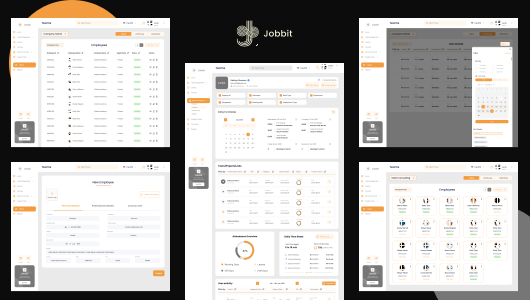
- Team spaces for day to day execution.
- An operations view for planning and critical paths.
- Vendor views that focus on their part of the plan.
That model shaped everything from information architecture and naming to how boards, timelines, and detail panes behave.
Branding
A warm, operational brand built around focus and clarity.
Logo

Brand tone
Clear enough for operations, friendly enough for day to day teams. The interface uses dark surfaces with warm accents so attention goes to the work, not the chrome.
Color palette
Typography
Display
Poppins / Roco
Headlines and key narrative moments.
Body
Inter
Body copy, labels, and UI text where clarity matters.
Challenge
Work, money, and time were split across tools that did not share context.
Teams used classic boards for tasks, email for purchase orders, and vendor tools for delivery dates. That meant there was no single place to answer simple questions like what is blocking this project, what depends on that delivery, or what is at risk this week.
- Project tools focused on tasks but ignored purchasing and timelines.
- Finance and vendor tools knew about money but not about project context.
- Ops leads relied on private spreadsheets as the unofficial source of truth.
Design approach
Start with one operating model, then design everything to support it.
I treated Jobbit as an operating console instead of another project board. Every part of the product is a different angle on the same story: what are we doing, who is involved, and what might slip.
- Define a shared vocabulary across work, money, and time.
- Keep the information architecture shallow and predictable.
- Use a quiet, intentional visual system so signal stands out when it matters.
Key flows
Three flows the product needs to make effortless.
I framed the work around a few core loops instead of a list of screens. If these flows feel natural, the rest of the product earns the right to exist.
Flow 01
A team plans and runs work
Boards and lists that show ownership, blockers, and how work rolls up to a bigger initiative.
- Shared status model in board, list, and timeline views.
- Inline updates with side panels instead of separate pages.
- Saved views for different disciplines on the same workstream.
Flow 02
Ops links work to purchasing
Operations leads see which tasks depend on which orders and approvals.
- Tasks and milestones own POs and vendor commitments.
- Risk surfaces when delivery dates drift against milestones.
- Approvals show who is blocking and what the impact is.
Flow 03
Vendors deliver with context
Vendors get just enough of the picture to deliver reliably without wading through noise.
- Narrow views with only the projects and items that matter to them.
- Simple timeline and status instead of another complex portal.
- Clear, concrete next steps for every item they own.
Process
How I worked from vague idea to a shippable system.
01 Understand reality
- Interviews with operations leads, project managers, and vendor coordinators.
- Shadowed planning sessions, weekly check ins, and fire drills.
- Mapped which tools claimed to be the source of truth and which ones actually were.
02 Shape the model
- Defined one concept of work that covers tasks, money, and time.
- Simplified overlapping terms into a shared vocabulary the team can repeat.
- Explored different information architectures and tested them against real scenarios.
03 Prototype and stress test
- Built flows that simulate messy weeks, not perfect days.
- Looked for any point where ownership, state, or risk was unclear.
- Used feedback to adjust hierarchy, layout, and wording instead of just colors.
04 System and handoff
- Component library for boards, timelines, and detail panes.
- Design tokens for color, spacing, and elevation tied to meaning.
- Interaction patterns and edge cases documented for engineering.
Reflection
The real design work was about reducing noise, not adding power.
Jobbit could have turned into a loud, high contrast control room. Instead, I worked to make it feel like a calm, trustworthy place to understand what is happening. The value is not in showing everything. It is in showing the right things with just enough detail to act.
This project shows how I handle complex B2B products. Start from behavior, define one mental model that fits that behavior, then build a system around it that teams can actually live in for years.
This project highlights that I
- Can lead end to end design for complex, multi surface products.
- Translate messy operational reality into one understandable system.
- Design visual languages that feel calm without losing hierarchy.
- Build design systems that engineering can extend without losing the story.